Showing posts with label Fitts Law. Show all posts

Human Computer nteraction (Part 2)

This is a continuation of Part 1 showing some very preliminary results. 

A very important aspect of conducting research is ethics, and when in a university environment this is handled through the internal review board (IRB). They make sure that any project dealing with human subjects is conducted ethically, and that all the subjects are treated properly, their rights not disrupted, and privacy is handled properly. After two months of handling the IRB paperwork, I finally have the go ahead to recruit subjects and see some data.

This data is simple, long logs recording the pixel (x,y) location of a users mouse cursor. The main point of this is to determine various user habits. If we can look at how users behaved, we can try to predict where they will be, and place all interfaces in the right spot. By placing navigation, and content in the right part of a computer program, we can make users life easier. 

Now we go back to the question asked in the previous section. Where is the location of the mouse over a period of a month? Does it trend towards the center of the screen? The upper left? The upper right? Maybe towards the bottom? How does a mac user differ from a windows user? how does a programmer differ from a secretary, or from somebody who uses the computer only for entertainment. 


What can we tell from this image. Obviously it s a a lot of data, and shows little detail. However it does point to a few very important habits. I tend highly to the upper left. I am also a very heavy user of the task bar, browser tabs, and close buttons. What happens if we look at all this data over shorter periods of time. More details, less proper averaging. 


This image shows the results from just a few hours of usage. I can't tell as much about where my mouse tends to live. I can however identify independent paths. What was the point of these paths, are they straight, or do i go down round-about paths. How fast do i go between targets.


Finally lets analyze another unknown user. I can not say anything abotu this user, but what can you tell from it. How does this user compare to me. Obviously if we were designing an interface for me, it would be of best use to put my navigation in the upper left but how about for this user.

I asked a lot of questions and posted some data. Comment, give me some ideas, theories, answers, and suggestions. Please cite me anytime you use this data. Suggest ideas and things you notice or want answered. All of this data is just now coming in, and we are still coming up with new analysis to run. 

Finally, I really need more participants for this. If you want to contribute to the academic filed contact me (razvan.orendovici@gmail.com). I would ask you to run a program on your computer which logs your mouse position. It does not log any personal data or key strokes. Doing this for me would be a great benefit.

Human Computer Interaction (Part 1)


I never really introduced the purpose of this blog, so let me take a second to do that. I spend a large amount of time reading various articles; I am what some might call a knowledge gatherer. At the same time I try to apply this knowledge, however it is difficult. My head is filled with too many things I am working on, want to work on, or am figuring out how to do. Needless to say there are a few simple things to describe what i will talk about: DESIGN, TECHNOLOGY, BUSINESS, and every now and then a little bit of politics, and social work.


Design to me has two components aesthetics, and usability. Both are equally important. This article i will cover usability through a few basic issues of Human Computer Interaction (HCI).


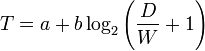
One of the major theories of HCI is Fitts's Law. Simply put, the time it takes for a person to hit a target (with their hand, with a mouse cursor, with their eyes etc) depends on 2 factors. Distance to target, and Size of target. The closer you are to a target, the quicker you can get there. DUH obvious. The larger the target is the quicker you can hit it. This is slightly less obvious but equally important. The main reason this works is because when its size increases, you will not overshoot as much, thus can go with much faster speed towards it, without having to worry about overshooting or slowing down as early. On a computer, a location on the edge of the screen is considered to be of infinite size. 


A target can be anything, the link the user wants to go to next, the save button, the button to close a window, the fact they were searching for, the search result that is most optimal. Mostly we deal with navigation and control, we want the user to be able to use the menu as quick as possible.


There are 5 spots on a computer screen that are optimal. The four corners all have infinite size. Thus i can move my mouse incredibly fast towards them without worry of overshooting. I will hit the corner, my cursor will stop there, and i can keep moving till i slow down. The fifth spot is the spot i am at. Distance to it is 0, thus i don't need to travel at all.


Following these five optimal points, there is a ranking, points on the edge are considered to be of infinite size in 1 direction, but can still be missed on the other axis, and the rest of the screen depends on the distance from "home."


So let's try to use this to figure out where to place our navigation and most useful information. Windows has the start button in the bottom left, and the clock in the bottom right (actually i lie, in the corner of the bottom right there is nothing). Most windows application have the close button in the top right, and another menu in the top left. OS X has the top corners eaten by its task bar, but the bottom corners are open (however, few things can go that low in OS X without getting in the way of the dock menu and complicating things). Linux just goes ahead and uses all four corners. All 3 operating systems own the current spot through the right click, and all application have their own right clicks. All 5 spots are gone. Perfection is out of the question.


Let's try to optimize. We have two variables to play with, the size, and location. I can easily change my button from being 50x50 pixels, and make it 200x200 pixels. That will make it easy to see, and easy to hit. How many buttons can i have on my screen then without them taking up the entire screen and leaving no room for content. Size is important, but can be difficult to work with. I can try to put my buttons closer to where the mouse is. 


Hold on.... WHERE IS THE MOUSE. We don't really have any idea where the mouse is actually in its home position. We could assume its dead center of the screen, or anywhere else.


That will be the focus of Part 2 coming sometime later this week. Until then, please feel free to leave comments, and possibly discuss where you think the mouse is at home, and how it behaves. I can probably test all of these hypotheses later, maybe even include them in part 2, or a later part.